Code : https://github.com/hanzladevofficial/micro-services
What is Kubernetes?
When you have multiple Docker containers running as independent services, you need something to manage them — restarting crashed containers, routing traffic between them, and making sure the right number of instances are always running. That’s exactly what Kubernetes (K8s) does.
Think of Docker as the technology that packages your service into a container, and Kubernetes as the platform that runs, manages, and connects those containers at scale.
Without Kubernetes, running 6 microservices means manually starting each container, hardcoding IPs that change on every restart, and hoping nothing crashes. With Kubernetes, you declare the desired state of your system and it continuously works to maintain it — automatically.
Our Cluster in Action
After applying all Kubernetes configurations, here’s what the dashboard looks like with all 6 services healthy and running:
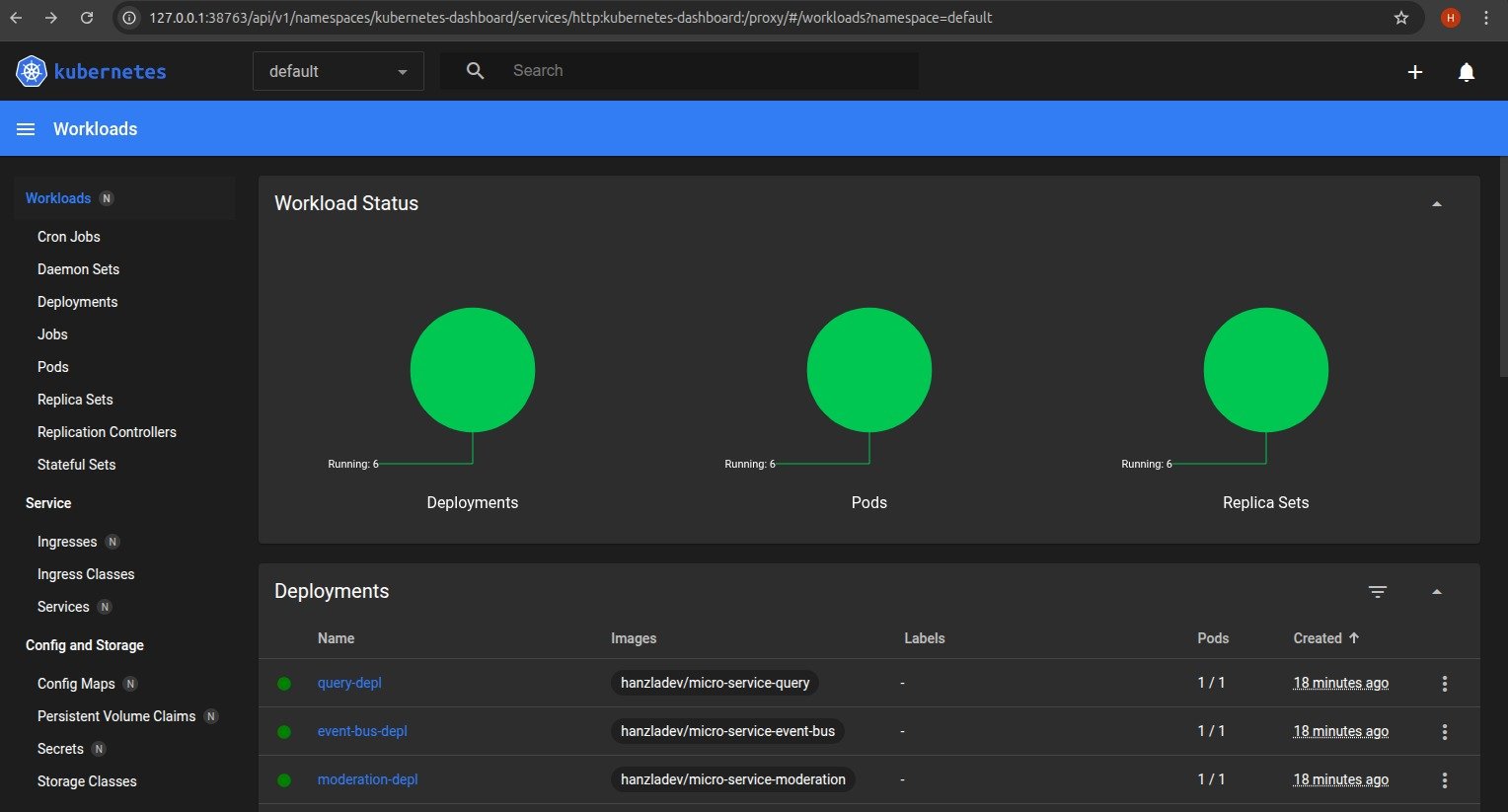 Every circle is green — meaning all 6 Deployments, 6 Pods, and 6 Replica Sets are running successfully. This is our entire blog application — posts, comments, query, moderation, event-bus, and client — all orchestrated by Kubernetes in the
 default namespace.
Services We’re Orchestrating
Before diving into Kubernetes concepts, here’s what we’re actually running:
| Service | Port | Purpose |
|---|
| Posts Service | 4000 | Create and store blog posts |
| Comments Service | 4001 | Create and manage comments |
| Query Service | 4002 | Aggregated read model for the frontend |
| Moderation Service | 4003 | Auto-moderate comments for banned words |
| Event Bus Service | 4005 | Central hub for async event broadcasting |
| Client Service | 3000 | React frontend |
Core Kubernetes Concepts
Pods
A Pod is the smallest deployable unit in Kubernetes. Each pod wraps one container — one service. Pods are ephemeral, meaning they can die and be recreated at any time. Because of this, you never rely on a pod’s IP address directly — it changes every time the pod restarts.
This is the problem that Services (ClusterIP) solve, which we’ll cover next.
Deployments
A Deployment tells Kubernetes how to run a pod — which Docker image to use, how many replicas to maintain, and what to do when you push an update. Each of our 6 services has its own deployment YAML file under infra/k8s/.
Here’s the deployment config for the Posts Service:
apiVersion: apps/v1
kind: Deployment
metadata:
  name: posts-depl
spec:
  replicas: 1
  selector:
    matchLabels:
      app: posts
  template:
    metadata:
      labels:
        app: posts
    spec:
      containers:
        - name: posts
          image: hanzladev/micro-service-posts
          imagePullPolicy: Always
replicas: 1 — we’re running one instance of each service. In production you’d increase this for high availability.imagePullPolicy: Always — Kubernetes always pulls the latest image from Docker Hub on every pod restart. This is critical during development so your changes are always reflected.
If a pod crashes, the Deployment controller notices the actual state (0 running) doesn’t match the desired state (1 running) and immediately spins up a new pod. This is self-healing.
Services (ClusterIP)
Since pod IPs change on every restart, Kubernetes Services provide a stable DNS name that always routes to the correct pod — regardless of how many times it’s been recreated.
We use ClusterIP services, which means they’re only accessible inside the cluster. This is what enables our microservices to talk to each other securely by name:
| DNS Name | Points To | Port |
|---|
posts-srv | Posts Service | 4000 |
comments-srv | Comments Service | 4001 |
query-srv | Query Service | 4002 |
moderation-srv | Moderation Service | 4003 |
event-bus-srv | Event Bus Service | 4005 |
client-srv | Client (React) | 3000 |
http://10.108.42.7:4005/events (which would break on restart), the event bus is always reachable at http://event-bus-srv:4005/events. Clean, stable, and Kubernetes handles the DNS resolution automatically.
Here’s what a combined Deployment + ClusterIP Service config looks like:
apiVersion: apps/v1
kind: Deployment
metadata:
  name: event-bus-depl
spec:
  replicas: 1
  selector:
    matchLabels:
      app: event-bus
  template:
    metadata:
      labels:
        app: event-bus
    spec:
      containers:
        - name: event-bus
          image: hanzladev/micro-service-event-bus
          imagePullPolicy: Always
---
apiVersion: v1
kind: Service
metadata:
  name: event-bus-srv
spec:
  selector:
    app: event-bus
  ports:
    - name: event-bus
      protocol: TCP
      port: 4005
      targetPort: 4005
selector: app: event-bus is what links the Service to the correct pod — it’s a label-based lookup that Kubernetes resolves automatically.
Ingress (NGINX)
ClusterIP services are internal only — the browser can’t reach them directly. Ingress is the single entry point for all external HTTP traffic. It acts as a reverse proxy, inspecting the incoming URL path and routing to the correct internal service.
We use the NGINX Ingress Controller with the following routing rules under the posts.com host:
apiVersion: networking.k8s.io/v1
kind: Ingress
metadata:
  name: ingress-srv
  annotations:
    nginx.ingress.kubernetes.io/use-regex: "true"
spec:
  ingressClassName: nginx
  rules:
    - host: posts.com
      http:
        paths:
          - path: /posts/create
            pathType: Prefix
            backend:
              service:
                name: posts-srv
                port:
                  number: 4000
          - path: /posts/(.*)/comments
            pathType: ImplementationSpecific
            backend:
              service:
                name: comments-srv
                port:
                  number: 4001
          - path: /posts
            pathType: Prefix
            backend:
              service:
                name: query-srv
                port:
                  number: 4002
          - path: /
            pathType: Prefix
            backend:
              service:
                name: client-srv
                port:
                  number: 3000
posts.com/posts/create → Posts Serviceposts.com/posts/abc123/comments → Comments Serviceposts.com/posts → Query Service (read all posts)posts.com/ → React Client
The frontend only ever talks to one domain. It has no idea there are 6 independent services behind it — that’s the API Gateway pattern in action.
Docker Images on Docker Hub
Each service is built into a Docker image and pushed to Docker Hub before Kubernetes can pull and run it. Our images:
hanzladev/micro-service-posts
hanzladev/micro-service-comments
hanzladev/micro-service-query
hanzladev/micro-service-moderation
hanzladev/micro-service-event-bus
hanzladev/micro-service-client
node:20-alpine as the base image — lightweight and fast to pull:
FROM node:20-alpine

WORKDIR /app
COPY package.json ./
RUN npm install
COPY . .

CMD ["node", "index.js"]
Deployment Flow
Here’s the full lifecycle of pushing a code change to a running pod:
Code Change
    ↓
docker build -t hanzladev/micro-service-posts .
    ↓
docker push hanzladev/micro-service-posts
    ↓
kubectl rollout restart deployment/posts-depl
    ↓
Kubernetes pulls latest image from Docker Hub
    ↓
Old pod terminates → New pod starts with updated image
    ↓
ClusterIP Service routes traffic to new pod
Full Architecture — How Everything Works Together
User Browser
      ↓
Ingress (posts.com) — NGINX routes by path
      ↓
┌─────────────────────────────────────────┐
│          Client Service (React)         │
│               Port 3000                 │
└─────────────────────────────────────────┘
      ↓                      ↓
Posts Service          Comments Service
  Port 4000               Port 4001
      ↓                      ↓
            Event Bus Service
               Port 4005
                   ↓
      ┌────────────┴────────────┐
      ↓                         ↓
Query Service          Moderation Service
  Port 4002               Port 4003
- User submits a comment in the React client
- Client → Ingress → Comments Service
POST /posts/:id/comments
- Comments Service creates comment with status
pending
- Comments Service emits
CommentCreated → Event Bus
- Event Bus broadcasts to all services
- Moderation Service receives
CommentCreated, checks for banned words
- Moderation emits
CommentModerated (approved/rejected) → Event Bus
- Event Bus broadcasts to all services
- Comments Service receives
CommentModerated, updates comment status
- Comments Service emits
CommentUpdated → Event Bus
- Query Service receives
CommentUpdated, updates its aggregated data store
- Client re-fetches from Query Service and renders the updated comment
Event Types Reference
| Event | Emitted By | Consumed By | Purpose |
|---|
PostCreated | Posts Service | Query Service | Notify about new post |
CommentCreated | Comments Service | Query, Moderation | Notify about new comment |
CommentModerated | Moderation Service | Comments Service | Send moderation result |
CommentUpdated | Comments Service | Query Service | Notify status change |
Why the Query Service Exists
In a naive microservices setup, the frontend would need to call the Posts Service for posts, then loop through each post and call the Comments Service for comments. That’s N+1 network requests — and if either service is down, the whole page breaks.
The Query Service solves this by listening to all events and maintaining a denormalized, pre-aggregated view of the data:
{
  "post-id-1": {
    id: "post-id-1",
    title: "My First Post",
    comments: [
      { id: "comment-id-1", content: "Great post!", status: "approved" },
      { id: "comment-id-2", content: "orange", status: "rejected" }
    ]
  }
}
GET /posts and gets everything it needs. This is the CQRS pattern (Command Query Responsibility Segregation) — separate services for writing data vs reading data.
Event Sourcing on Restart
When the Query Service restarts, it loses its in-memory data. To recover, it calls GET /events on the Event Bus which returns the full event history, and replays every event to rebuild its state from scratch. This is event sourcing — the event log is the source of truth, not the service’s local state.
Getting Started
Prerequisites
- Docker Desktop installed (with Kubernetes enabled)
kubectl CLI tool- NGINX Ingress Controller installed
Setup Steps
1. Build and push all Docker images:
docker build -t hanzladev/micro-service-posts ./posts
docker push hanzladev/micro-service-posts

# Repeat for comments, query, moderation, event-bus, client
kubectl apply -f infra/k8s/
posts.com to your hosts file:
On Linux/Mac, edit /etc/hosts. On Windows, edit C:\Windows\System32\drivers\etc\hosts:
4. Open the app:
Navigate to http://posts.com in your browser.
Key Concepts Summary
| Concept | What It Does | Why We Need It |
|---|
| Pod | Runs one container | Smallest deployable unit |
| Deployment | Manages pod lifecycle + replicas | Self-healing, rolling updates |
| ClusterIP Service | Stable DNS name for pods | Pods change IPs on restart |
| Ingress | Routes external traffic by URL path | Single entry point for the app |
| Event Bus | Broadcasts events to all services | Loose coupling between services |
| Query Service | Aggregated read model | Avoid N+1 requests from frontend |
| Event Sourcing | Rebuild state from event history | Survive service restarts |
What This Is Not (Yet)
This is a learning project built to understand microservices fundamentals. In a production system you’d add:
- Persistent databases (MongoDB, PostgreSQL) instead of in-memory storage
- A proper message broker (NATS, RabbitMQ, Kafka) instead of the custom event bus
- Authentication and authorization across services
- Distributed tracing (Jaeger, Zipkin) to debug cross-service flows
- Monitoring and alerting (Prometheus, Grafana)
- CI/CD pipeline for automated builds and deployments
- Multiple replicas per service for true high availability
Run kubectl get pods to check the live status of all pods. All 6 should show Running with 1/1 ready. Use kubectl logs <pod-name> to debug any service that isn’t behaving as expected.
Don’t forget to add 127.0.0.1 posts.com to your hosts file — without this your browser can’t resolve the domain to your local Kubernetes cluster and you’ll get a “site can’t be reached” error.
The moderation service rejects any comment containing the word “orange” — this is intentionally simplified. In a real system you’d call an external moderation API or run an ML model here instead.
